
Blocks on your pages
View .mdThis is one of the two setups from Install Kismet Fixtures on WordPress. Choose it when the site keeps its own page structure and you want Kismet’s search, results, cards, calendars, and booking inside pages you build. Complete steps 1 to 4 of the install guide first.
Routing source stays on Local, the default.
1. Set the URL fields
Section titled “1. Set the URL fields”On Settings, Kismet Fixtures, fill in the URL fields. These are read only in Local routing.
| Field | Value |
|---|---|
| Property URL prefix | The first path segment of every property page, for example vacation-rentals. Default properties. The plugin serves /{prefix}/{property-slug}/ for every synced property, and /{prefix}/ as a listing page. |
| Reviews page path and Rates page path | The sub-page segments under each property, so /{prefix}/{property-slug}/reviews/ and /rates/. Defaults reviews and rates. |
| Search results path | Where the search bar sends guests. Set it to the page you build in step 2, for example /find-a-stay/. Leave it blank to send searches to the listing page at /{prefix}/. |
Pick a prefix that no existing page or post type uses. The activation check warns if it conflicts.
Save, then purge the host cache. Property pages are live at once; you do not create them.
2. Build the results page
Section titled “2. Build the results page”Create a WordPress page at the results URL and place the results page fixture in it:
[kismet_results_page]Block: Kismet Results Page. It renders the search bar, filters, the property grid, and the map toggle. Add mode="grid" or mode="map" to set the default view.
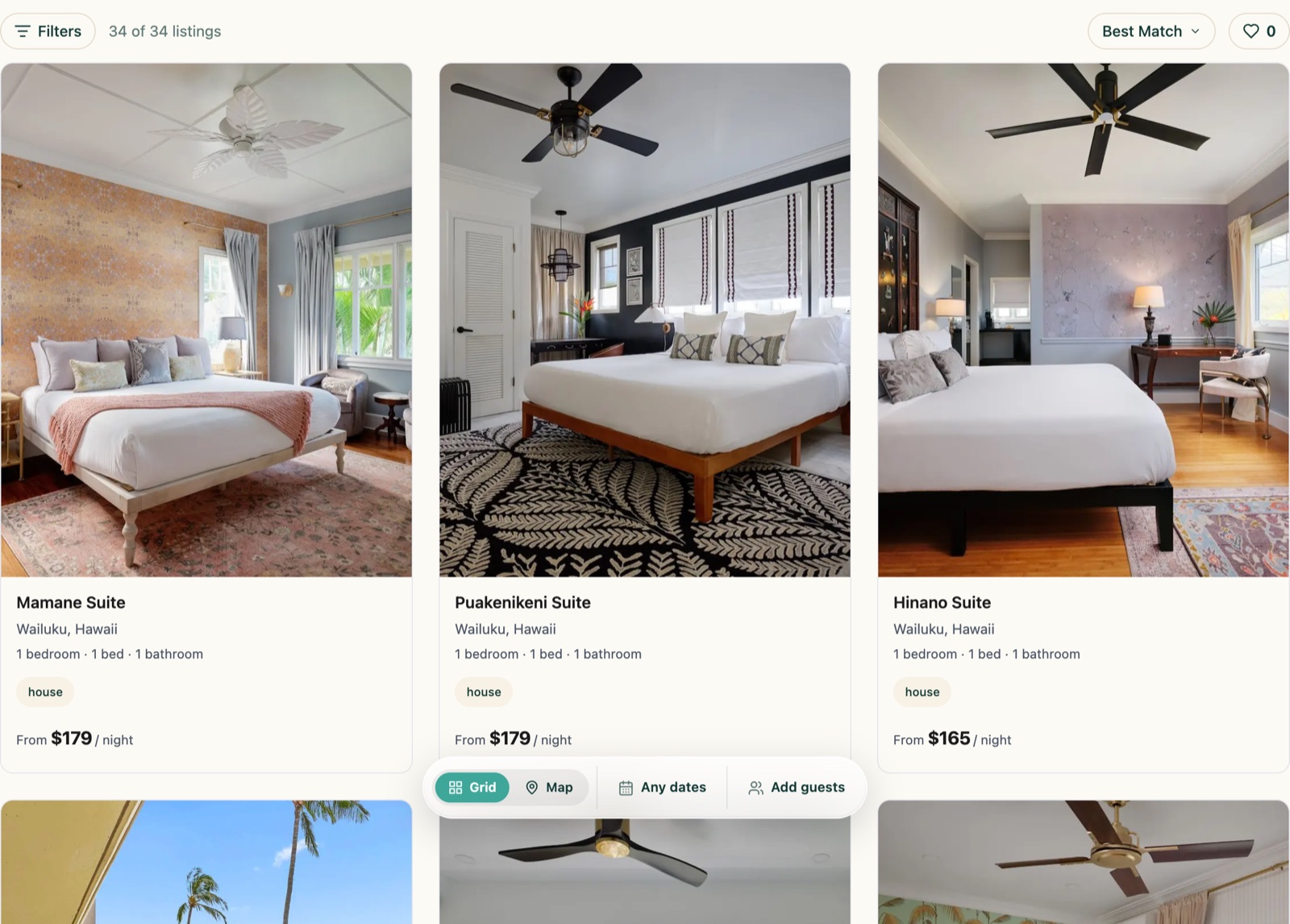
If you would rather compose the page yourself, use the parts: Kismet Search Bar, Kismet Filter Drawer, Kismet Search Results for the grid alone, and Kismet Map View.
3. Place the search bar
Section titled “3. Place the search bar”Usually in the home page hero:
[kismet_search_bar]
Block: Kismet Search Bar. The Search button navigates to the Search results path from step 1 with the dates and guest count in the query string. Per instance, results_path overrides the destination and accent, go, sel, and mid override the four brand colors.
4. Property pages
Section titled “4. Property pages”You do not build these. Every synced property is served at /{prefix}/{property-slug}/ with the gallery, description, spaces, amenities, calendar, rates, reviews, and the booking action. The booking panel opens from that page; you do not build a checkout page. The reviews, rates, and policy sub-pages are served under the same path.
The page uses your theme’s header and footer. If the theme header fights the page, the Host header section of the settings screen can restyle it on Kismet pages only.
5. Other fixtures you can place
Section titled “5. Other fixtures you can place”Anywhere on the site, as a block from the Kismet category or as a shortcode:
| To show | Shortcode |
|---|---|
| One property as a card | [kismet_property_card slug="the-property-slug"] |
| A Book button for one property | [kismet_booking_cta slug="the-property-slug"] |
| A property’s photo gallery | [kismet_gallery slug="the-property-slug"] |
| A property’s nightly rates | [kismet_rate_calendar slug="the-property-slug"] |
| A lead-capture form | [kismet_form], needs the collection entity ID |
The slug is the property’s Kismet slug, visible in its URL on the results page. The full list is on the Fixtures overview.
6. Tell Kismet your URLs
Section titled “6. Tell Kismet your URLs”Local routing works without declaring anything in Kismet. Declare the URLs anyway, once, for the production hostname. Kismet uses them for the canonical and og:url of every page it describes, for the edge worker that records crawler visits on cached pages, and for the booking links it hands to AI agents. Undeclared, those point at Kismet’s own copy of the page instead of the client’s site.
- Results page: in Kismet, Domains, route map, the Results row.
- Property pages: in Kismet, Checkout, Booking Engine, Property URL Mapping. Use the pattern fill with your prefix, for example
https://www.example.com/vacation-rentals/{kismet-slug}/, review, save.
Staging inherits the production paths, so declare them once.
7. Styling
Section titled “7. Styling”The manager sets the fixture theme in Kismet: fonts, colors, corner radius, card style, and the booking panel variant. The plugin also has an Extra CSS field under Advanced. Put fixture overrides there and theme overrides in your theme, so plugin updates never overwrite them. Fixture styles are scoped and do not restyle the rest of the site.
Return to the install guide for verification and go-live. For this setup, the property URL in the checklist is /{prefix}/{property-slug}/.